
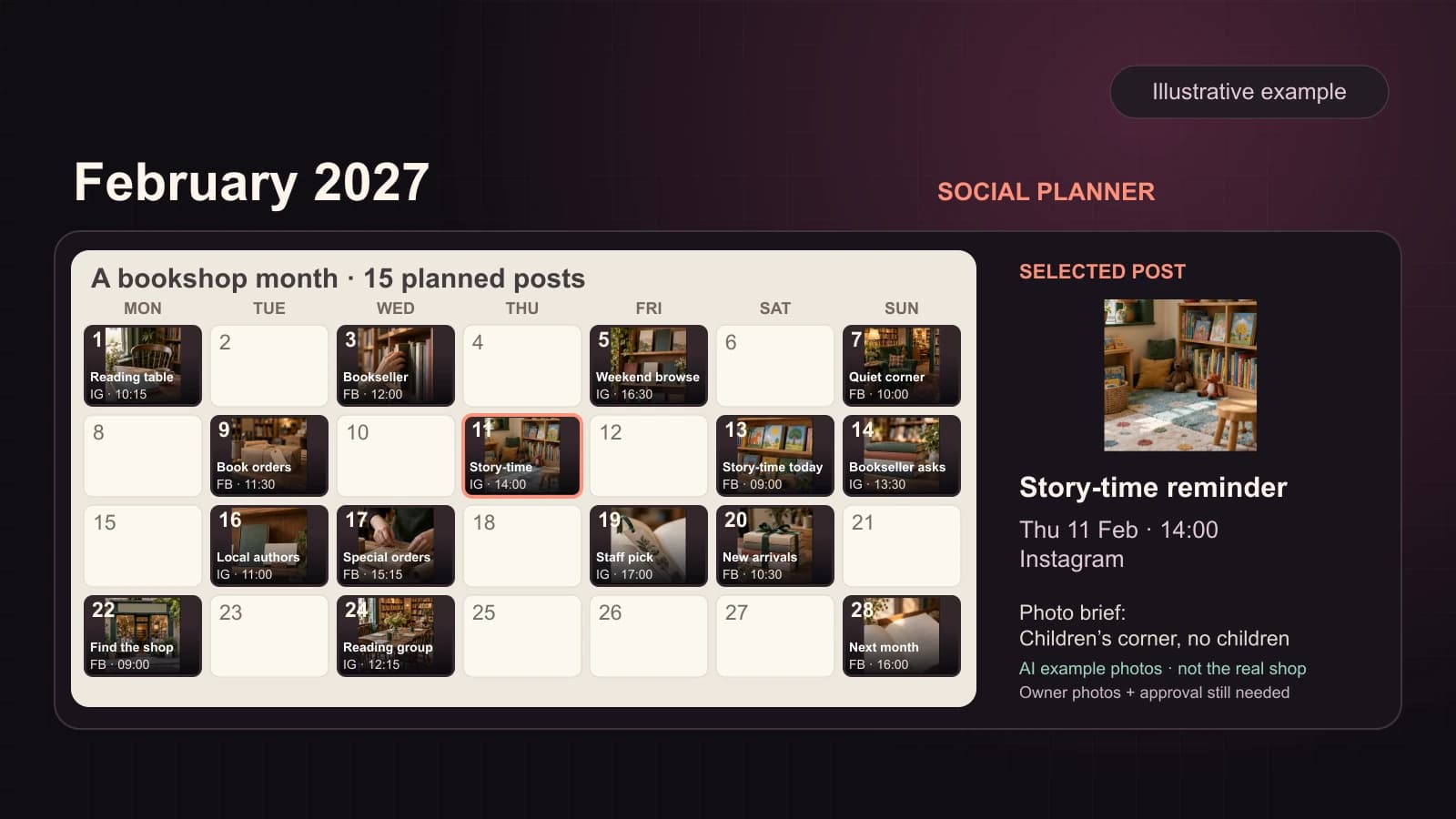
A useful monthly social media calendar tells you what will appear, when, where, and which real image it needs. It is not a grid with fifteen identical thumbnails or a list of vague “post about your business” reminders. For a small business, start with real events and customer decisions, then spread complete posts across the month. Leave empty days empty.
Below is a filled example for February 2027 with 15 posts across four full weeks. It is an illustrative plan for an independent bookshop, not a record of posts Mazuly has published. The cover uses AI-generated bookshop photographs to illustrate the calendar, not a real shop's inventory, events or customer results. The “image to use” column is a shot list: an owner would need to supply their own actual images and confirm every event, title and time before scheduling. A separate café calendar deals with changing menu stock and same-day food photos.
First collect the facts and assets
Ask four questions before placing a single tile on the calendar:
- What is genuinely happening this month—new arrivals, opening-hour changes, an event, a customer question, or an ordinary service people overlook?
- Which original photos can the business use, and which still need to be taken?
- What should someone do after seeing each post: visit, reserve a place, order a book, ask a question, or remember the shop for later?
- Which channels are actually connected, and who will check the details before posts go out?
For the bookshop example, imagine the owner has a confirmed Saturday children's story time at 11 a.m., with no reservation required and a current event page carrying the details, a late-month reading group, a small table of local authors, and a working book-order enquiry page. Those details are fictional inputs for the example, not real event information. The calendar should not pretend every photographed title is in stock all month or reuse the same shelf image as if it were fifteen different moments.
A worked month: 15 distinct posts
All times are local to the business. They are planning choices for this example, not a universal “best time to post.” Facebook and Instagram are shown as named destinations so the owner can inspect what will appear where. The time must be confirmed in the actual scheduling interface. Dates and weekdays are for February 2027.
| Date | Post name and job | Image to use or capture | Channel | Planned time |
|---|---|---|---|---|
| Mon 1 | This month's reading table: show the theme, not an invented bestseller | Fresh photo of the actual front table | 10:15 a.m. | |
| Wed 3 | Meet a bookseller: introduce one real staff recommendation | Staff portrait and the recommended book, with permission | 12:00 p.m. | |
| Fri 5 | Weekend browsing invitation: show why the shop is worth a visit | Current wide photo of the shop floor | 4:30 p.m. | |
| Sun 7 | A quiet corner to explore: show an actual space without customers | Customer-free reading-corner photo | 10:00 a.m. | |
| Tue 9 | Can you order a book through us?: explain the enquiry route | Real order-desk or staff-at-work photo | 11:30 a.m. | |
| Thu 11 | Story-time reminder: give the confirmed Saturday details | Photo of the real children's corner, without children | 2:00 p.m. | |
| Sat 13 | Story time today: state the actual start and any attendance limit | Same-day prepared reading area photo | 9:00 a.m. | |
| Sun 14 | A bookseller's question: invite requests for reading suggestions | Staff book stack that is actually in the shop | 1:30 p.m. | |
| Tue 16 | Local-author table: introduce titles currently stocked | Distinct photo of the real local-author display | 11:00 a.m. | |
| Wed 17 | How a special order works: answer lead-time and pickup questions | Current order counter and the shop's actual form or sign | 3:15 p.m. | |
| Fri 19 | One staff pick for the weekend: explain who might enjoy it | Approved cover or shelf photo of a title currently available | 5:00 p.m. | |
| Sat 20 | What arrived this week?: show arrivals only after checking stock | Fresh same-day arrivals table photo | 10:30 a.m. | |
| Mon 22 | Find the shop: help a first-time visitor reach the right entrance | Clear storefront and entrance photo | 9:00 a.m. | |
| Wed 24 | Reading-group reminder: give the confirmed meeting time and route | Real reading-group table before attendees arrive | 12:15 p.m. | |
| Sun 28 | Next month's question: invite a suggestion without promising a future event | Current team or open shelf photo | 4:00 p.m. |
There are four posts in each of the first three weeks and three in the final week. The pattern moves across weekdays and weekends instead of filling the same three columns every week. Four posts may be too many for another owner; reduce the cadence before filling the grid with weak repeats. A calendar is useful only if the business can supply the real inputs.
Turn a calendar tile into a publishable post
Consider “Story-time reminder” on Thursday 11 February. The calendar tile alone is not the deliverable. A finished post could include:
- Image: the shop's own photograph of the prepared children's corner, without identifiable children unless permission has been obtained.
- On-image line: “Story time · Sat 13 Feb · 11 a.m.” Use it only after the owner confirms the event and local time.
- Caption: “Children's story time is Saturday 13 February at 11 a.m. at the bookshop. No reservation needed. Visit our event page for the reading selection and any updates before you travel.”
- Channel and time: Instagram, Thursday at 2:00 p.m. local time.
- Next step: the shop's verified event page, once the owner confirms it exists and contains the same event details.
Hashtags, if used, should describe the real shop or event rather than claim a reach boost. The post still needs a final check: story-time date, age suitability, attendance limit, reservation route and opening hours must match what the shop can offer. The example is a writing model, not evidence that this bookshop exists or that the post performed well.
Use the calendar to make decisions, not just fill space
The fifteen tiles have different jobs: introduce a person, explain ordering, show a real event, answer a question, remind people where to visit, and make current stock easy to picture. That mix gives the owner something to check. If the shop cannot photograph new arrivals on Saturday morning, the “arrived this week” tile should wait or change. Publishing an old display photo under a current-stock caption would be misleading.
In Mazuly Social Planner, the owner can give the month's priorities and use saved Brand Brain context to prepare a calendar with image posts, captions, channels and times. The owner can change a caption, image, or date. After a plan is approved, eligible posts may publish to connected channels under the owner's settings.
If you are starting with no photo library, do not try to create fifteen pieces of fiction. Start with the real assets you have, list the shots worth taking, and keep the month editable. The weekly marketing routine helps you revisit the plan without rebuilding it from scratch.
Before approving the month
Read the calendar at phone size. Can you tell which dates contain a post? Can you identify each image, post name, channel and time without opening a second screen? Then open several posts and check the on-image text, caption and next step. Fix duplicated creative, inaccurate details and crowded days before the schedule begins.
A beautiful calendar is only useful if the business can recognise and act on every tile.