
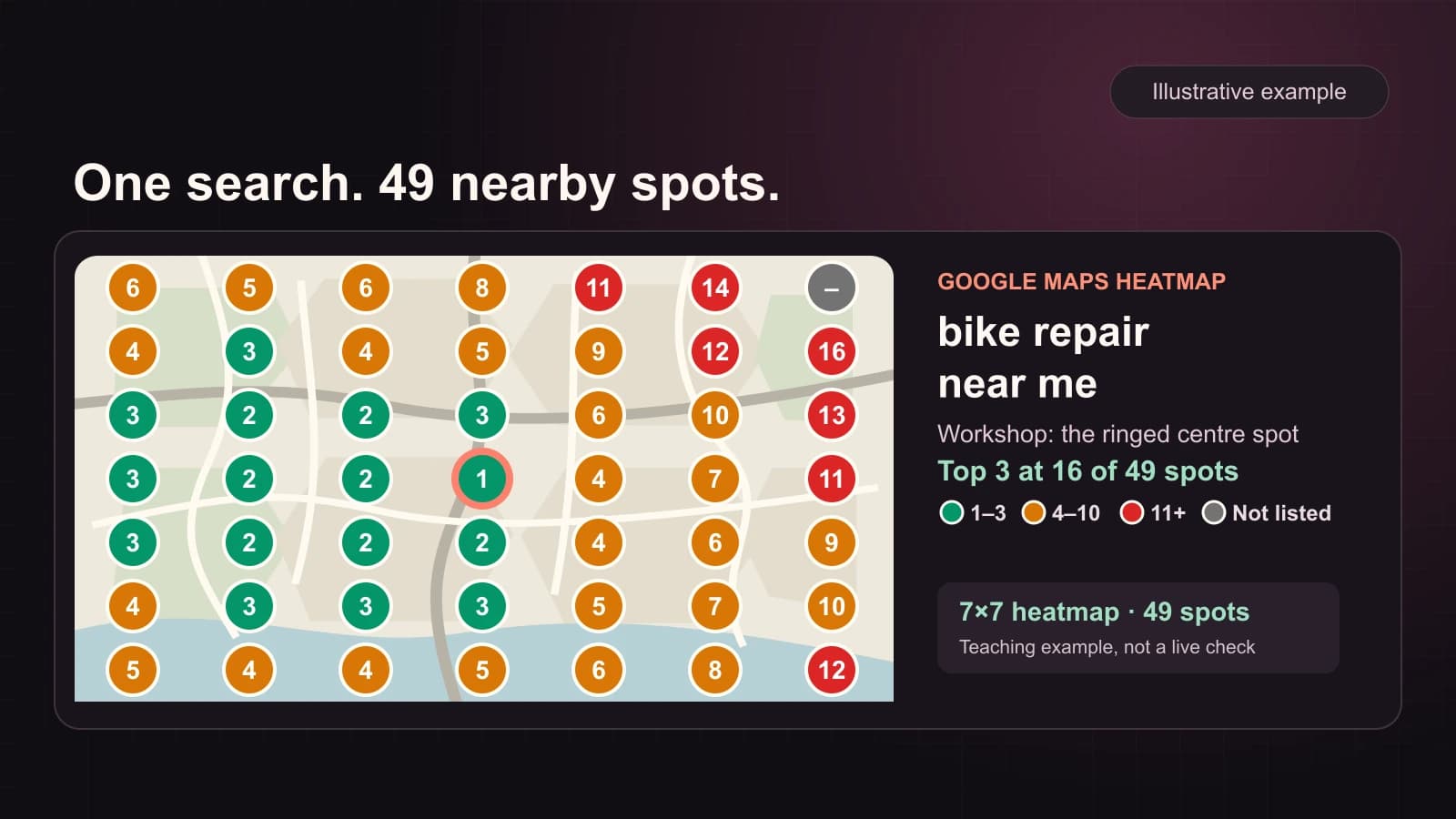
A Google Maps ranking grid checks the same customer search from many nearby spots and shows where your business appeared at each. A 7×7 grid uses 49 spots around your location. Read it as a map of where you're easy or hard to find for one search on one date, not one "rank" for your town.
If a bike workshop shows up near its own street but drops across the river, that is useful to know. It does not mean the owner should buy an ad, add keywords to the business name, or build a page for every street. First, understand what was measured.
What a 7×7 ranking grid measures
Google Maps results change with the searcher's location. Google says local results are "mainly based on relevance, distance, and popularity," and that "distance refers to how far each business is from the customer who's searching" (Google Business Profile Help, checked 18 Nov 2026). So a single search from your shop counter tells you very little about a customer two miles away.
A grid fixes that by running the same search from a pattern of points:
| Grid | Spots checked | What it's good for |
|---|---|---|
| One search from your phone | 1 | A quick look; it mostly reflects where you're standing |
| 3×3 grid | 9 | A rough sense of near vs far |
| 7×7 grid | 49 | A clear pattern: which directions and distances are strong or weak |
Each spot records your position in the Maps results for that search at that point, or that you weren't in the results checked there.
Read the grid like a map, not a scorecard
Here is a fictional teaching example, not a real Mazuly or Google result: a bike repair shop in the middle of the grid, the search "bike repair near me," all 49 spots checked on the same day. "–" means the shop wasn't in the results checked at that spot.
| W3 | W2 | W1 | Center | E1 | E2 | E3 | |
|---|---|---|---|---|---|---|---|
| N3 | 9 | 7 | 6 | 6 | 8 | – | – |
| N2 | 7 | 5 | 4 | 4 | 6 | 9 | – |
| N1 | 5 | 3 | 2 | 2 | 4 | 7 | – |
| Center row | 4 | 2 | 1 | 1 | 3 | 6 | 9 |
| S1 | 5 | 3 | 2 | 2 | 4 | 7 | – |
| S2 | 6 | 4 | 3 | 3 | 5 | 8 | – |
| S3 | 8 | 6 | 5 | 5 | 7 | 9 | – |
What the pattern says, in plain words:
- Near the shop, it's strong. The middle spots are 1–3.
- West is stronger than east. At the same distance, the west columns sit around 2–6 while the east columns slip to 6–9 and then drop out.
- The far east edge is empty. In this example, that's across the river, where a rival shop sits.
The center "1" is one observation. Reporting "we rank #1 on Google Maps" from it would be wrong. A fair summary is: "For 'bike repair near me' on 4 November, the shop was in the top 3 at the spots closest to it, weaker to the east, and not found at the far eastern edge."
Five grid shapes and what they usually mean
Once you've read a few grids, the same shapes come up again and again. Here's what each one usually points to, and the first thing to check:
| What the grid looks like | What it usually means | First thing to check |
|---|---|---|
| Strong in the middle, fading evenly toward every edge | Normal: distance is doing its job | Nothing to fix. Note how far out you stay in the top 3 |
| Strong on one side, weak or empty on the other | A cluster of rivals over there, or a border like a river or highway | Do you actually serve that side? If not, leave it |
| Weak right around your own address, better farther out | Several strong rivals packed close to you | Compare your profile with theirs: category, services, reviews |
| Empty almost everywhere, even in the middle | The search doesn't match your profile, or the listing has a problem | Search your exact business name. If you're missing, read why is my business not showing up on Google Maps |
| Scattered, with good and bad spots side by side | Ordinary movement in the results | Don't act on one check. Compare the same search in a few weeks |
These are patterns to investigate, not diagnoses. Two grids with the same shape can have different causes.
What the grid can't tell you
- It doesn't explain why. A weak area may reflect distance, a strong competitor, how well your listing matches the search, or ordinary variation. The grid shows where to look, not which edit will help.
- It isn't every search. "Bike repair near me" and "bicycle tune-up Riverside" can look different. One grid covers one phrase.
- It isn't calls or bookings. Appearing in the results is not the same as being chosen.
- It isn't Google's formula. Google says "there's no way to request or pay for a better local ranking." A grid makes variation visible; it doesn't reveal or change the ranking.
For a real check you should always be able to see the search phrase, center location, area covered, date, and each spot's result. Without those, two grids can't be compared fairly.
What to do after you read the grid
A grid gives you an observation, not a list of fixes. Spend 30 minutes on this:
- Is the weak area somewhere you actually serve? If the east side is outside your area, record the boundary and move on. Don't advertise service there to chase a dot.
- Is the search a real service you sell? A kitchen-door repair shop shouldn't chase "kitchen remodeler" if it doesn't remodel kitchens. If the phrase was wrong, choose a better one for the next check; don't pretend the old grid measures the new phrase.
- Check the facts customers see (pick one to fix):
| Check | What to look at | Useful action if it's wrong or missing |
|---|---|---|
| Business Profile | Address or service area, category, hours, phone, website link, services | Correct the public fact. Don't add a service or area just to match the search. |
| Matching service page | Does a new customer see the exact service, the real area, examples of the work and a way to get in touch? | Add the missing fact or contact route on that page. |
| Reviews and listings elsewhere | Do recent replies or directory listings contradict your current details? | Correct what you control; reply to reviews under your usual settings. |
- Write one line in a log so the next check means something:
| Date and search | Pattern | Fact checked | Action | Next check |
|---|---|---|---|---|
| 4 Nov; "bike repair near me" | Strong near shop, weaker east | Repair page didn't list the east-side area we do serve | Added the real areas served and a recent job photo | Same search and grid in four weeks |
If the facts are already right, the useful decision may be to change nothing and keep watching. When you compare later, keep the same search, center and grid size. A change next month might come from competitors, data updates or normal variation; it doesn't prove your last edit caused it.
How Mazuly's Maps grid works
Mazuly's Google Maps rank tracker runs a 7×7 grid: 49 spots around your location. Your main search is checked every week, included in your plan. Extra checks use credits, and the price is shown on the button before you tap.
The result is a heatmap of colored dots at the 49 real spots that were checked, with nothing painted in between. Tap a spot to see who's in the top 3 there. You can compare a new check with the last one for the same search and grid, spot by spot. The grid is tighter for a café or salon, whose customers come from close by, and wider for suburban storefronts and businesses that visit customers. It shows you where to look, and you can just ask: "Where do we show up for bike repair near me?"
For the free manual way to check one search, see how to check Google Maps ranking for free. If you don't appear anywhere at all, start with why is my business not showing up on Google Maps.
Maps ranking is different from AI answers
The grid samples Google Maps results. Mazuly's AI visibility checker asks whether ChatGPT, Gemini, Bing AI Mode, Google AI Overview and Google AI Mode name your business when people ask about what you do. A good Maps spot doesn't mean an AI mention, and the other way round. Keep the two observations separate; the guide to checking AI-answer mentions covers the second one.
Sources and further reading
- Google Business Profile Help: How local results are ranked (checked 18 Nov 2026)
- Google Search Help: Why your search results differ from others (checked 18 Nov 2026)
- Google Business Profile weekly check
Frequently asked questions
What is a Google Maps ranking grid?
It's a check that runs the same Google Maps search from a pattern of spots around your business and records your position at each one. A 7×7 grid uses 49 spots. It shows how your visibility changes with the searcher's location.
Is a 7×7 grid better than a 3×3 grid?
It shows more. Nine spots give a rough near-versus-far picture; 49 spots show direction and distance clearly, so you can see, for example, that you're strong to the west and weak across the river.
Why is my Maps ranking different a few streets away?
Because Google weighs how far each business is from the person searching, along with relevance and popularity. Moving the search point changes the distance to you and to every competitor, so the order changes too.
How big an area does a 7×7 ranking grid cover?
It depends on the tool and the business. A café whose customers walk in from a few blocks away needs a tighter grid than a plumber who drives across town. Mazuly sets it from your business type: about 1.2 miles out for food, drink, salons and shops, about 2 miles for other storefronts, and about 5 miles for businesses that visit customers.
Can a ranking grid improve my position?
No. It measures; it doesn't change Google's results. Use it to choose a true, useful fix (a missing service area, a wrong category, a thin service page) and then compare later with the same search and grid.