
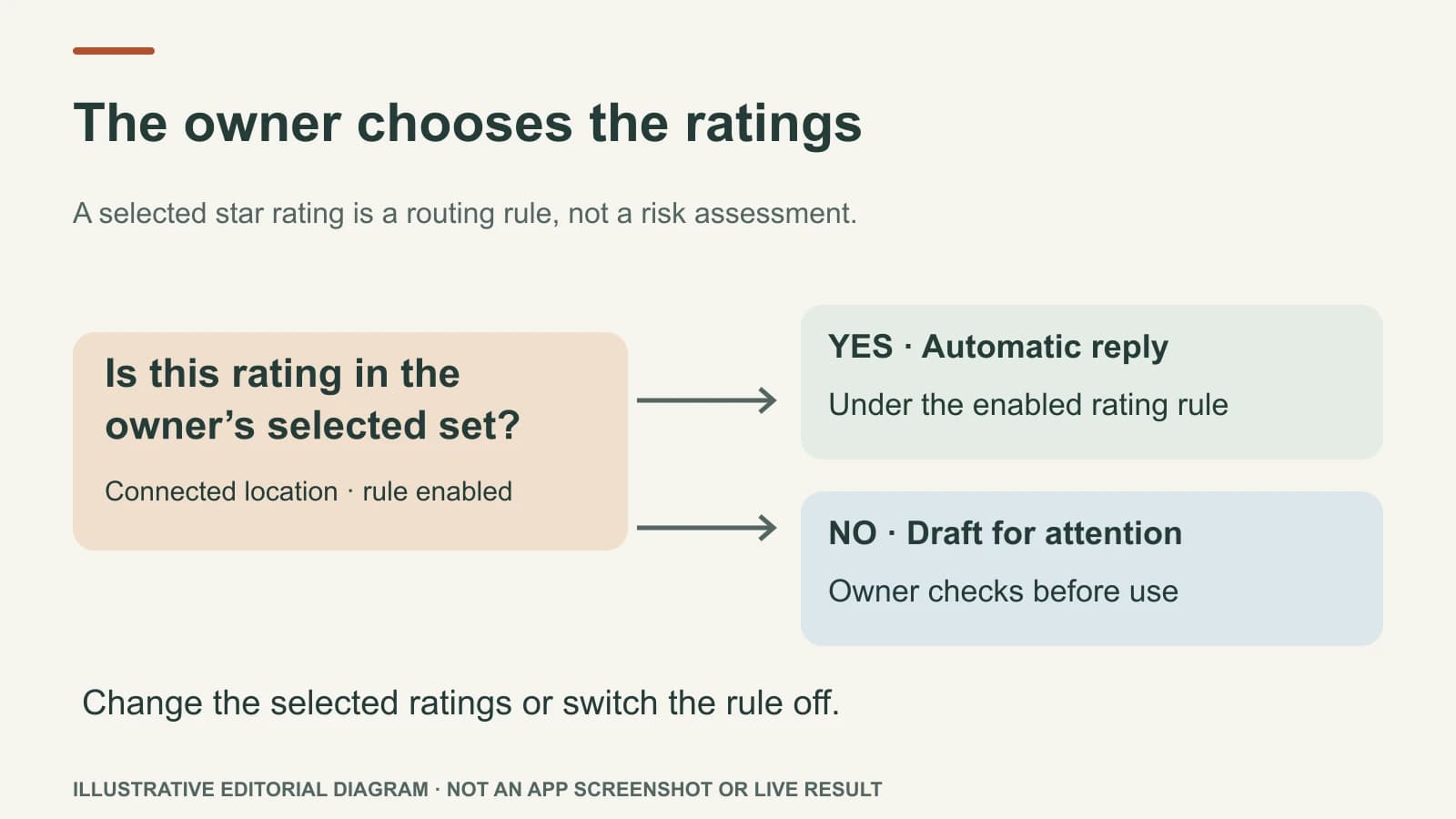
Yes. With a connected Google Business Profile and the owner's automation settings enabled, Mazuly can write and send replies automatically for the star ratings the owner selects. Reviews outside those selected ratings wait for owner attention with a draft. The owner can change the selected ratings or turn automatic replies off. This is an owner rule, not a decision a customer review or Ask Mazuly chat can silently make.
The familiar setup is “automatically answer four- and five-star reviews; hold one-, two-, and three-star reviews.” It is an example, not the only rule or a universal default. An owner could choose three through five, five only, or another set. The important question is not “Can AI write a reply?” It is which replies should go out without a person reading them first?
What the owner decides
Before using automatic replies, decide three things: which business location is connected; which star ratings may receive an automatic reply; and whether the business is ready to let those replies go out under its current settings. Keep the emergency pause available. A reply is public, and a poor one can be read by the reviewer and every future customer.
Here is an illustrative rule for a local landscaping company:
| New Google review | Chosen automatic set: 4 and 5 stars | Owner's next job |
|---|---|---|
| 5 stars, with specific praise | Eligible for an automatic reply if the other required controls allow it | Check periodically that tone and facts remain accurate |
| 4 stars, with a small suggestion | Eligible under this example rule | Consider whether the suggestion needs an operational follow-up |
| 3 stars | Held for owner attention with a draft | Read the actual concern, edit, then choose whether to post |
| 2 stars, disputed timing | Held for owner attention with a draft | Investigate privately; do not reveal booking or customer details |
| 1 star, no written explanation | Held for owner attention with a draft | Decide whether a brief, non-speculative public reply is useful |
The star rating alone never tells the whole story. A four-star review may contain a real problem. An owner who does not want that risk can choose a narrower set, such as five stars only, or switch automation off. Conversely, selecting all ratings means the owner has deliberately allowed automatic replies for all five; the system should not pretend low ratings always require approval. The rule must be visible and understandable before it is enabled.
See the difference between an automatic reply and a held draft
Suppose a five-star reviewer writes: “The team explained the garden plan clearly and left the site tidy.” A suitable reply might be:
Thank you for sharing this. We are glad the garden plan was clear and that the team left your space tidy. We appreciate you trusting us with the work.
It acknowledges what the reviewer actually said. It does not claim the garden won an award or offer a discount. If the owner selected five stars for automatic replies and all other controls are met, a response like this may be sent without an individual approval step.
Now suppose a two-star reviewer writes: “The crew arrived later than expected, and I couldn't get an update.” Under the four-and-five-star example rule, Mazuly prepares a draft but does not send that reply automatically. The owner can investigate and edit it. A restrained public version might be:
We are sorry the arrival and communication did not meet your expectations. We would appreciate a chance to look into what happened. Please contact us through our usual support number so we can discuss it directly.
That draft does not assert what caused the delay or reveal an appointment history. If the owner cannot verify the facts, it should not invent them. The exact response depends on the real situation and the owner's judgment.
Safeguards matter more than a quick reply
Use saved Brand Brain context so the reply sounds like the correct business and location. Keep services, tone and limits current. Do not add or repeat private appointment, payment, health, or other client details in public replies—even if the reviewer mentions them. If the review is complex or sensitive, acknowledge the feedback in general terms and move the detailed conversation to a private channel without arguing in the public thread.
Google's review-reply guidance says replies are public, should be concise and relevant, and should avoid repeated generic thanks or promotions. For negative reviews, it advises protecting privacy and offering a private route for complex issues. Automation should preserve those standards, not replace them with a faster template.
If a rating-only review offers no details, the reply should not invent a service or outcome. If a review seems false or policy-breaking, investigate and use Google's reporting process where appropriate; a public accusation is not a substitute for that process. The owner should periodically inspect actual replies, especially after a change in services, staff, location or policy.
Review replies and review requests are different jobs
Choosing an automatic reply rule does not authorize manipulating which reviews customers leave. A Google review link or QR code should invite genuine feedback, not only positive feedback. Google's Maps content policy prohibits incentivized reviews and selectively soliciting positive reviews. Do not offer a discount for a five-star rating or send unhappy customers to a hidden private form while only happy customers receive the public review link.
Mazuly's Google Review Replies page explains the product controls. For the wording of a reply itself, use the review-response guide. The two questions are related but distinct: who decides whether a reply may be sent automatically, and what should that reply say?
A safe first setup
Start with the narrowest rating set you are comfortable with. Connect the correct business location, confirm the owner settings, and read real examples of short and detailed reviews. Check that saved business facts and forbidden claims are current. Then monitor the first public replies and the held drafts. If the business changes or you are unsure, pause automation while you review the rule.
The benefit is not a claim that every review will be answered instantly or that a higher Maps ranking follows. It is a clear division of work: routine reviews can move under an owner-selected rule; reviews needing judgment remain with the owner.